
Running Codex over SSH, keeping sessions alive with tmux, and coordinating work on a shared GPU.
I'm writing this from my hotel in Providence, Rhode Island. It's my first time here, and I'm at Brown University for the residential week of my master's program. My DGX Spark is back at home. I wasn't going to bring it along, but I still wanted to use it while I was away.
Lately, I've been using the Spark to run small experiments and fine-tune models. If an idea comes to mind, I can queue it up, try it, look at the results, and move on. At least for the experiments I'm running, compute hasn't been the thing holding me back. I've found that really useful, and I wanted to keep doing it while I was here.
At the airport, I was already connected to the Spark from my laptop, and that was working fine. But once we got on the plane and had to put our laptops away, I started wondering whether I could connect from my phone instead. The machine was still running at home. I just needed another way to reach it.
There are already guides out there on how to do this. I decided to work through it myself, and this post is me documenting how I got it working. I can now connect from my phone and continue working on those experiments without needing my laptop in between.
Link to How I connected everythingHow I connected everything
Here's the setup I ended up using, at a high level. I'll walk through how I connected each part so you can follow along if you want to do the same with your own machine.
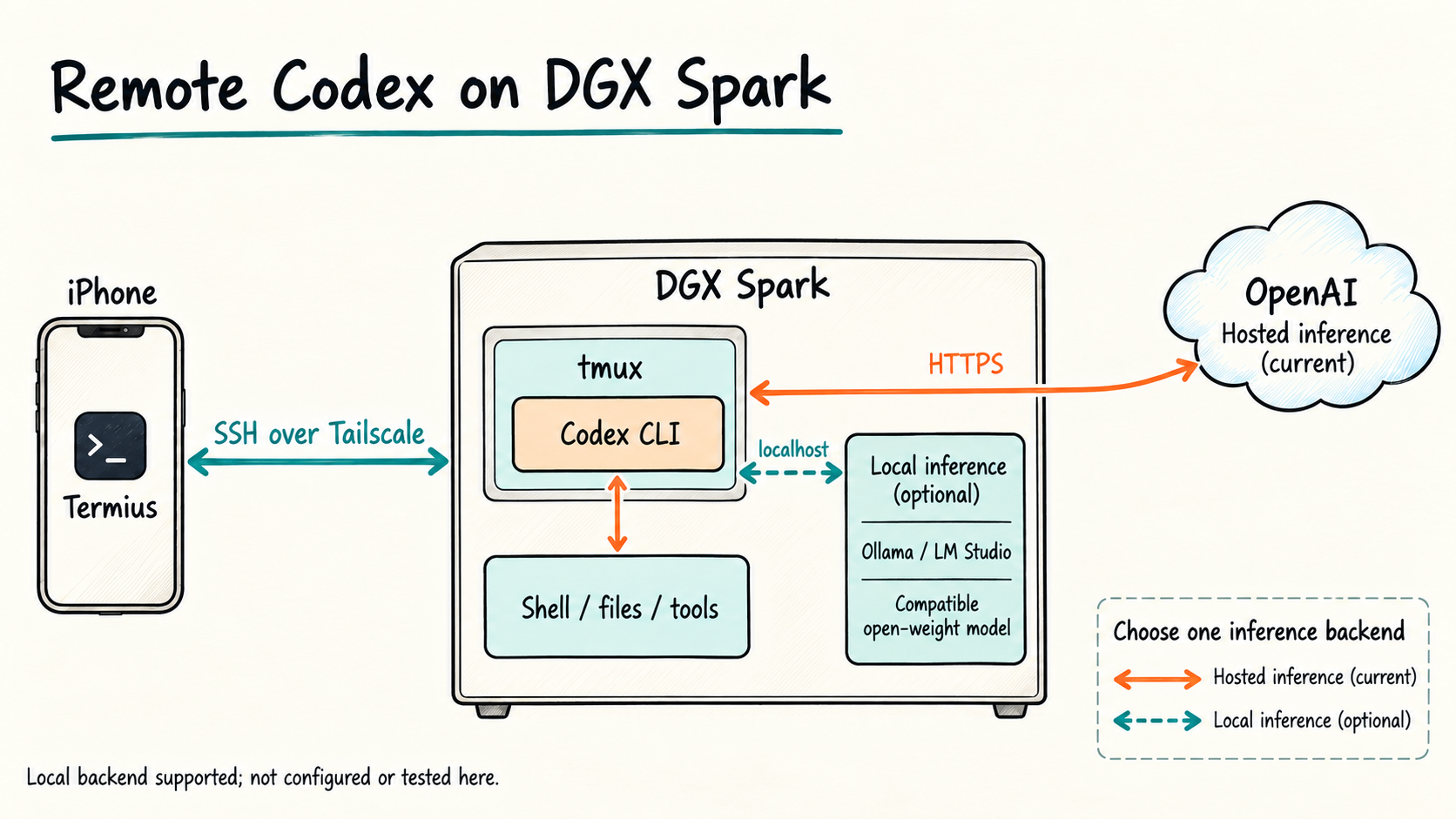
I use Termius on my phone to open a terminal on the Spark. Tailscale connects the two devices, and Codex runs inside a tmux session on the Spark. That last part matters because I don't want the session to disappear every time my phone disconnects.
In the setup I'm using now, Codex sends its requests to OpenAI. The commands it runs, the files it edits, and the experiments it starts are on my Spark. So even though I own the hardware doing that work, the model powering Codex is still hosted by OpenAI. Context sent to that model leaves the machine.
There's also a local-model option in the diagram. I'll come back to that, because it is possible, but I haven't configured or tested it with Codex on this machine yet.
Link to First, I needed to reach the SparkFirst, I needed to reach the Spark
I'd already put the Spark on Tailscale when I was setting it up to run models at home. That gave me a private connection between my devices without having to expose the Spark's SSH port to the public internet.
On my phone, I connected Tailscale using the same account as the Spark. Once both devices showed up, I could use the Spark's Tailscale address to reach it from Termius.
I left Exit Node set to None. I only needed to reach this machine; I didn't need all my phone's browsing traffic going through home. Tailscale explains that distinction in its exit-node documentation.
In Termius, I added a host with:
| Setting | What I entered |
|---|---|
| Address | The Spark's Tailscale address |
| Connection | SSH |
| Port | 22 |
| Username | My Linux username on the Spark |
| Authentication | My Spark login credentials |
These are the credentials for the Spark, not the password for my laptop or my Tailscale account. SSH keys are another option if that's how you normally connect.
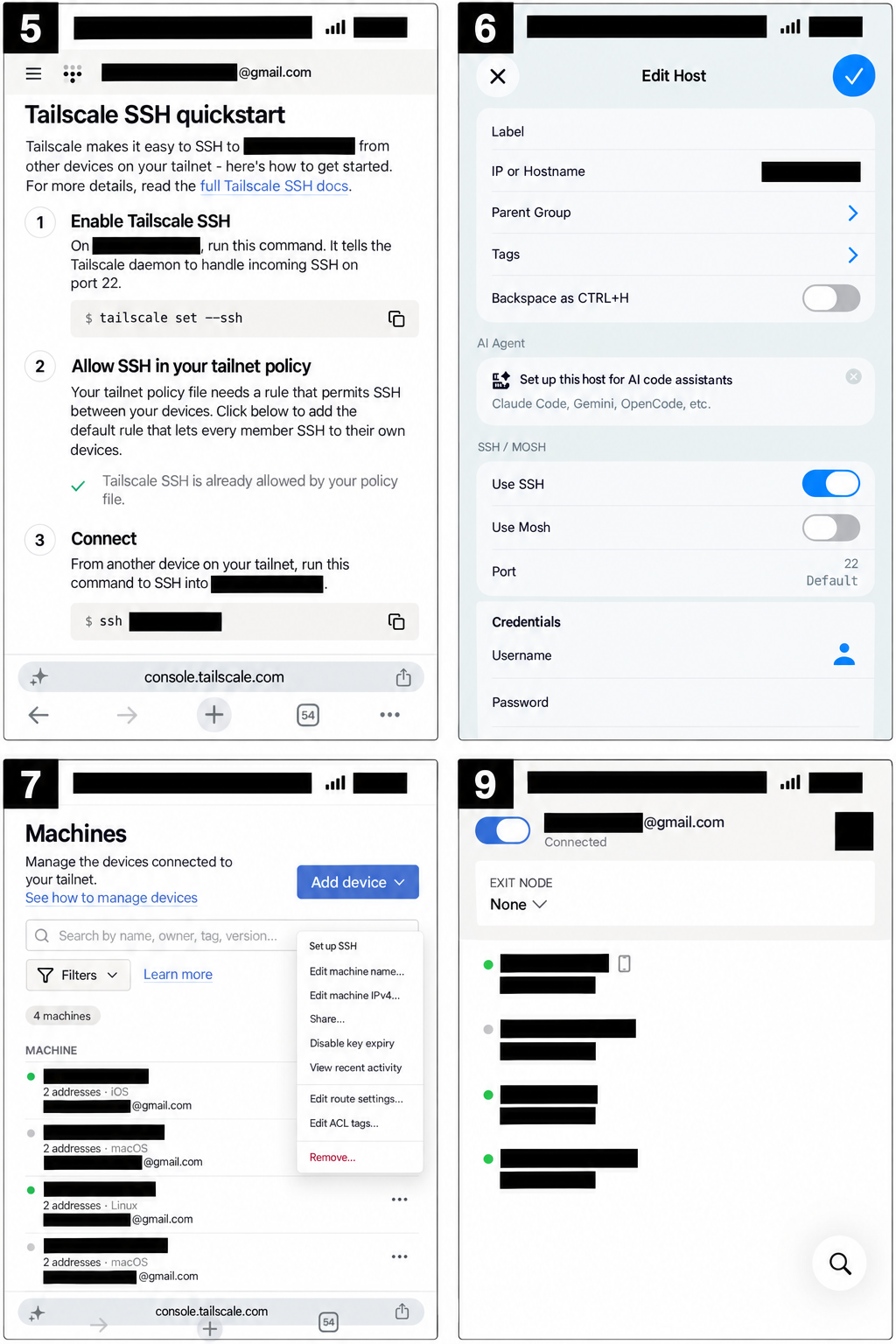
The network and host settings I worked through. Account details and addresses are masked. These composites were made with AI-assisted image editing, so they illustrate the screens rather than reproduce every pixel of the originals.
One thing worth separating here: the Tailscale SSH quickstart shown in the screenshots is for Tailscale's own SSH feature. You can also use regular SSH over the Tailscale network. You don't need to enable that separate feature just because you're using Termius.
Once I connected, I had a terminal on the Spark. I ran:
hostname
nvidia-smi
That let me check which machine I was on and see what was using the GPU. I actually typed nvidia-sim the first time. A small typo, but it brought me to the next part: I could reach the machine, but I didn't want to look up a Linux command for everything I wanted to do.
Link to Then I put Codex on the SparkThen I put Codex on the Spark
What I wanted was to describe a task the way I do from my laptop and have an agent work through it on the machine.
We installed Codex CLI directly on the Spark using the official installation instructions. I signed in with my ChatGPT account. That uses my plan's Codex allowance rather than separate API-key billing. It still has usage limits; installing it on another machine doesn't give me another allowance. Codex pricing
We also configured it to use ChatGPT sign-in, since I specifically didn't want to accidentally start paying for API usage.
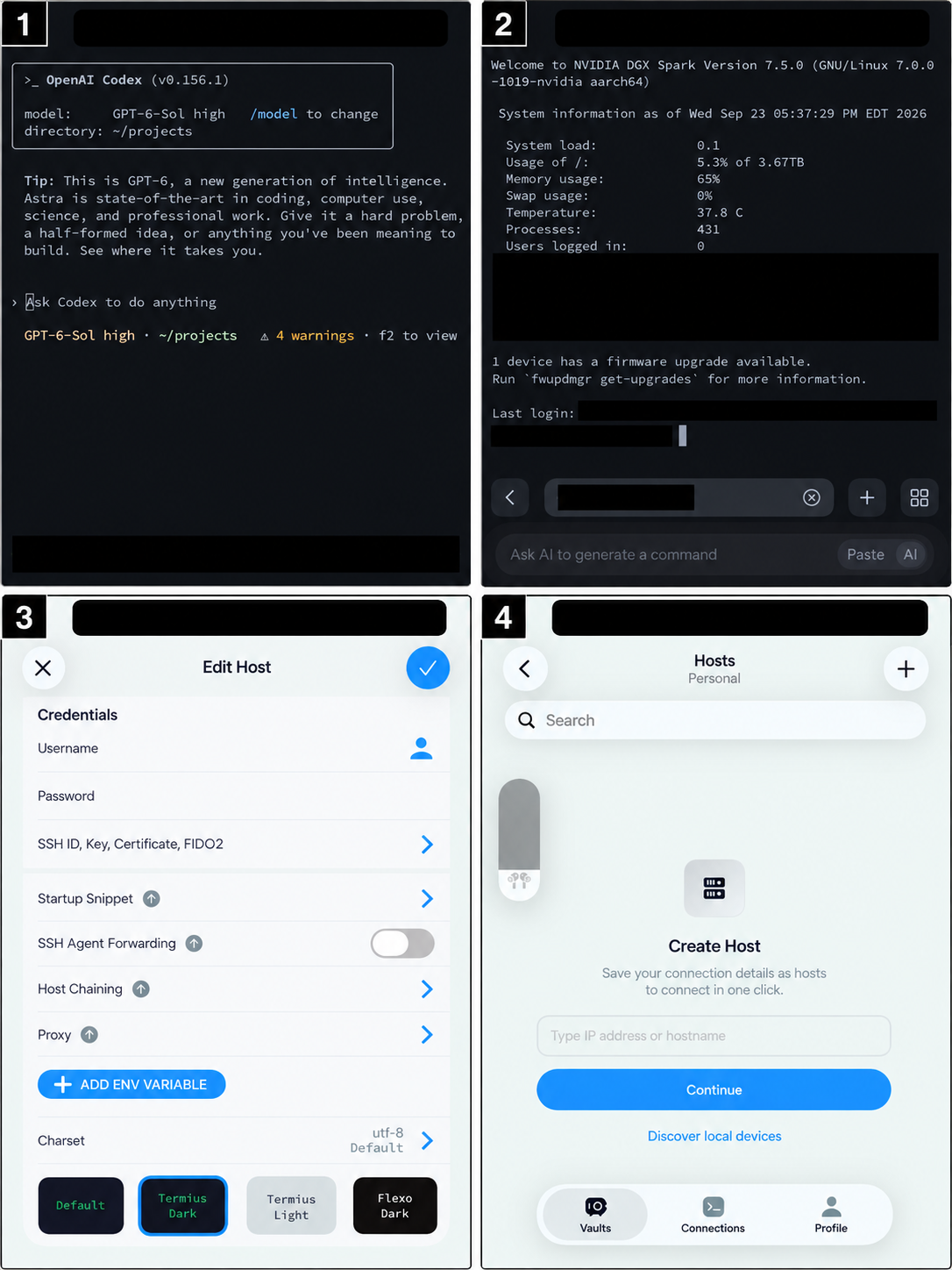
Codex open on the phone, alongside the shell and Termius settings. These are privacy-masked, AI-assisted composites. The Codex screen shows the interface running; it doesn't establish that a particular task completed. It also shows four warnings that this walkthrough hasn't investigated.
Now I can type something like:
Check which models are running and how much memory is available. Don't stop or change anything.
That is the sort of request I want to make from my phone. I can read the response, ask a follow-up, and approve actions when needed. I'm still in a terminal, so it isn't quite the same interface as chatting in the app, but I don't have to write every command myself.
Link to I wanted to come back to the same sessionI wanted to come back to the same session
A phone connection is going to drop at some point. I might change networks, close Termius, or put the phone away. I wanted the session to stay on the Spark when that happened.
For that, we used tmux and made a small shortcut:
~/.local/bin/spark-codexThis is a script we created for my setup, not a command that comes with Codex. It starts or attaches to a named tmux session. Inside that session, it checks the login and starts Codex.
If you're setting up your own version, the basic pattern is:
tmux new-session -A -s codex
codex
Run codex when you're starting a new shell in that session. If you reconnect and Codex is already open, just continue there. tmux keeps the terminal running after a disconnect; it doesn't keep a process alive through a server reboot.
I also added this to ~/.tmux.conf:
set -g mouse onTo apply it without restarting the session:
tmux set -g mouse onThat enables mouse events for scrolling, selecting panes, and resizing them. How finger gestures map to those events depends on the phone terminal's settings. We verified that the option was on at the server.
Link to The conversations don't automatically follow meThe conversations don't automatically follow me
The Codex session on the Spark is separate from this conversation on my laptop. They share my account's allowance, but not automatically the conversation history. OpenAI explains the distinction in its Work and Codex documentation.
I can connect from either device to the same running tmux session on the Spark. That's how I return to the same work. If I'm talking to a separate agent on the laptop, it needs context about what's happening on the Spark.
That became important pretty quickly.
Link to I didn't want one agent interrupting anotherI didn't want one agent interrupting another
The Spark already had several things running. I didn't want an agent from my phone deciding to free up GPU memory by stopping something another session was using.
So I asked for a shared message board where agents could check who was doing what before starting new work. Then I realized that could become its own problem if every agent kept adding long updates that the next one had to read.
I wanted short messages. Almost caveman short.
This is an example of the format:
CLAIMS 1
gpu:gb10 | phone-session | Train speech model. PID 1234.

NOTES 1
mac-session>phone-session [conflict] Need GPU. Test 2m. Safe?
That's an example, not a training run from this walkthrough.
The board lives on the Spark. An agent checks it before new work, claims the resources it needs, and leaves a short update when something changes. If another session owns the resource, it contacts that session. Interrupting existing work still needs my explicit approval.
We capped task descriptions at 120 characters and notes at 180. Notes on the same topic replace the previous update and normally expire after 24 hours. Active work claims don't expire automatically. Older history moves to an archive, so agents aren't reading the whole history just to find out whether the GPU is busy.
There is no agent constantly polling the board and burning tokens to tell me nothing has changed. Messages get checked at task checkpoints, so replies aren't instant either.
The board rejects conflicting claims, but it can't stop an agent from ignoring the rules and running a shell command anyway. It's a coordination system we have to follow, not a replacement for permissions. Existing jobs are protected even if they haven't been added to the board.
Link to Could the model run locally too?Could the model run locally too?
I wanted to check this because the Spark is already running local models. Could I use one of those instead of sending Codex's requests to OpenAI?
Codex does support local inference through Ollama or LM Studio. We checked the installed CLI's --oss option against OpenAI's documentation and Ollama's integration guide.
The phone connection would stay the same. Termius would still connect to the Spark over Tailscale; Codex would talk to a model server on the Spark instead of the hosted model.
But having a model downloaded isn't enough. The server needs to support the protocol Codex expects, and the model needs to handle its tool calls. We haven't tested my existing local language model in that role. Qwen Image, which I use through ComfyUI, is an image generator and isn't a replacement for the coding model.
For now, the diagram shows that as an option, not something I'm claiming to have working. It would use the Spark's GPU and memory alongside everything else, so I'd need to check capacity before starting it. The local server would still expose an API, but that isn't the same as paying OpenAI per request.
Link to Where this leaves meWhere this leaves me
I still prefer my laptop for plenty of things. I'm not planning to spend hours reviewing code on my phone.
But if I get an idea while I'm away, I can reach the machine, check what's already running, and ask it to work on something. I can come back to the same session later instead of waiting until I'm home to start.
That's what I wanted out of this. The Spark stays at home, and I can keep using it for the experiments I bought it for.