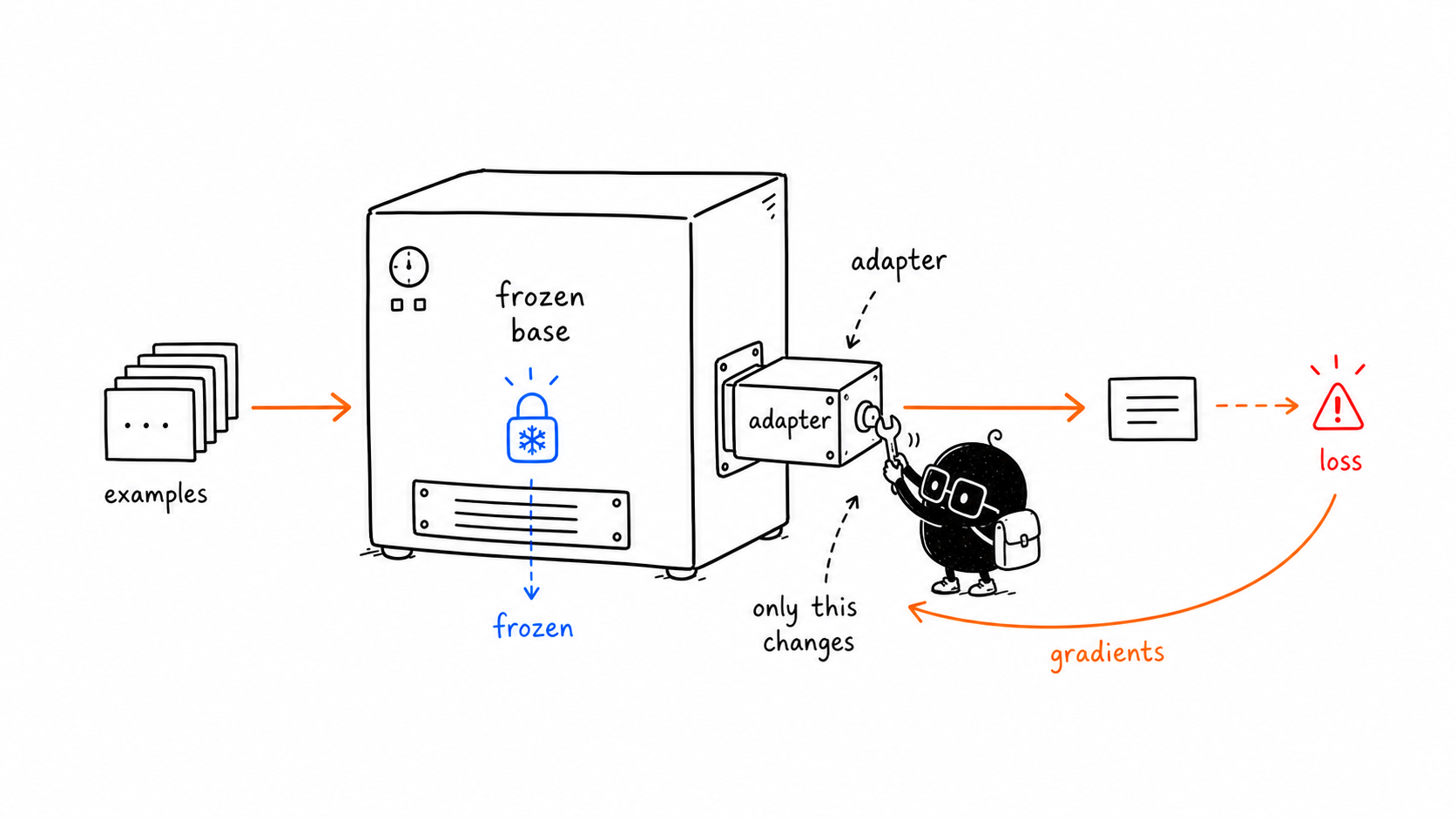
LoRA training looks like normal model training from the outside:
- Feed examples into the model.
- Get outputs.
- Measure loss.
- Backpropagate gradients.
- Update trainable parameters.
The difference is step 5.
With LoRA, the optimizer updates the adapter weights, not the base model weights.
Link to The Base Still RunsThe Base Still Runs
Freezing the base model does not mean the base model is ignored.
The base model still does the main computation. The input still travels through the model layers. The LoRA adapter contributes extra learned updates at selected points.
The output is affected by:
base model behavior + adapter behaviorBut only the adapter changes during training.
Link to What The Training Data DoesWhat The Training Data Does
Training data teaches the adapter what kind of behavior to add.
For example:
- If your examples show customer-support answers, the adapter learns support-answer patterns.
- If your examples show medical summarization, the adapter learns that domain style and vocabulary.
- If your examples show a strict JSON format, the adapter learns to bias the model toward that format.
The adapter is not storing the dataset like a folder of files. It is adjusting small matrices so the model is more likely to produce the desired outputs.
Link to Loss And GradientsLoss And Gradients
Two terms matter here.
Loss is the number that says how wrong the model was.
Gradients are the training signals that say which direction the trainable weights should move to reduce that loss.
In full fine-tuning, gradients can update many or all model weights.
In LoRA, gradients flow through the model to calculate the training signal, but the optimizer only changes the LoRA adapter parameters.
That is why the image shows the backward arrow returning to the adapter drawer only.
Link to What Gets TrainedWhat Gets Trained
The trainable pieces are usually inserted into selected linear layers inside the model.
In many transformer models, LoRA is often applied to attention projection layers, such as query and value projections, though exact target modules depend on the model and training setup.
In practical tooling, you will see settings like:
target_modules
r
lora_alpha
lora_dropout
These decide where adapters are placed and how they behave during training.
Link to Learning Rate Is Usually DifferentLearning Rate Is Usually Different
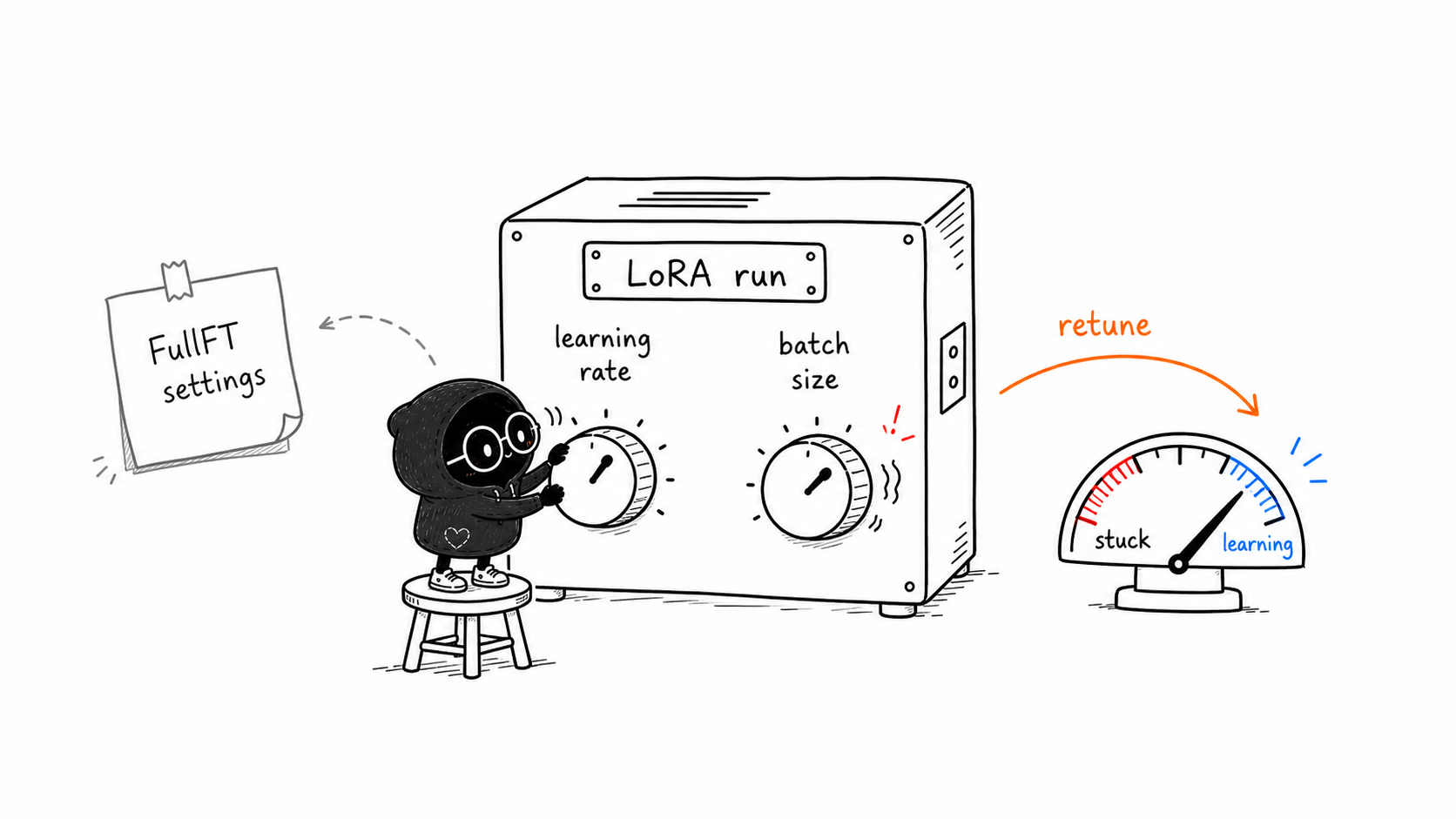
This is one of the most practical gaps Thinking Machines calls out:
Do not automatically reuse the learning rate you would use for full fine-tuning.
Their LoRA primer says LoRA often needs a much larger learning rate than full fine-tuning, roughly 10x larger in their current empirical guidance.
That does not mean "always multiply by 10 blindly." It means:
- LoRA has different optimization dynamics from full fine-tuning.
- A full-fine-tuning learning rate can make LoRA look worse than it really is.
- Learning rate is one of the first hyperparameters to check when a LoRA run underperforms.
In other words, if LoRA is not learning, do not only blame rank. Check learning rate.
Link to Batch Size Can Matter More Than ExpectedBatch Size Can Matter More Than Expected
Thinking Machines also reports that LoRA can be less tolerant of very large batch sizes than full fine-tuning in some settings.
The important part is subtle:
Increasing rank does not necessarily fix this batch-size penalty.
Why? Because LoRA's update is parameterized as a product of matrices, B @ A. That can train differently from directly optimizing the original full matrix.
Practical interpretation:
if LoRA underperforms, test learning rate and batch size before assuming LoRA is too weakThis is a very important beginner lesson. LoRA can look worse than it is if you run it with full-fine-tuning habits.
Link to Why This Saves MemoryWhy This Saves Memory
Training needs more memory than inference because training keeps extra information:
- gradients
- optimizer states
- activations needed for backpropagation
When you train all model parameters, these costs get large.
LoRA helps because most parameters are frozen. The optimizer does not need full optimizer state for every base-model weight. It mainly needs optimizer state for the small adapter parameters.
That is the practical win.
Link to What Makes A Good LoRA DatasetWhat Makes A Good LoRA Dataset
LoRA is not a cheat code for bad data.
A good adapter needs examples that are:
- consistent
- representative of the desired behavior
- clean enough that the model can learn the pattern
- formatted like the task you want at inference time
If your examples are noisy or contradictory, the adapter can learn noisy or contradictory behavior.
The adapter is small. It needs a clear signal.
Link to Terms To LearnTerms To Learn
-
Forward pass: The model takes inputs and produces outputs.
-
Loss: A number measuring how wrong the output was.
-
Backpropagation: The process that computes gradients from the loss.
-
Optimizer: The training algorithm that updates trainable parameters.
-
Target modules: The model layers where LoRA adapters are inserted.
-
Dropout: A training technique that randomly drops some signals to reduce overfitting.
-
Learning rate: The optimizer step size. LoRA often needs a different learning rate than full fine-tuning.
-
Batch size: How many examples are used together for one optimizer update. Very large batches can sometimes hurt LoRA more than full fine-tuning.
Link to Check YourselfCheck Yourself
Answer these in plain language:
- Does the frozen base model still run during training?
- What does the loss measure?
- What do gradients update in LoRA?
- Why does LoRA need good examples?
- Why might copying a full-fine-tuning learning rate make LoRA look bad?
Link to Chapter SummaryChapter Summary
LoRA training uses the base model during the forward pass, computes loss and gradients normally, but updates only the adapter weights. The base model stays frozen, while the adapter learns the useful behavior change. In practice, learning rate and batch size can strongly affect whether LoRA looks good.